More security and high performance! Those were the main goals achieved with Nepuga's new study portal, Moodle.
The new structure invested in UX (User Experience), which lets users get faster responses.
Check out some of the improvements and new services that have been implemented and will give Nepuga students a better experience while they study.
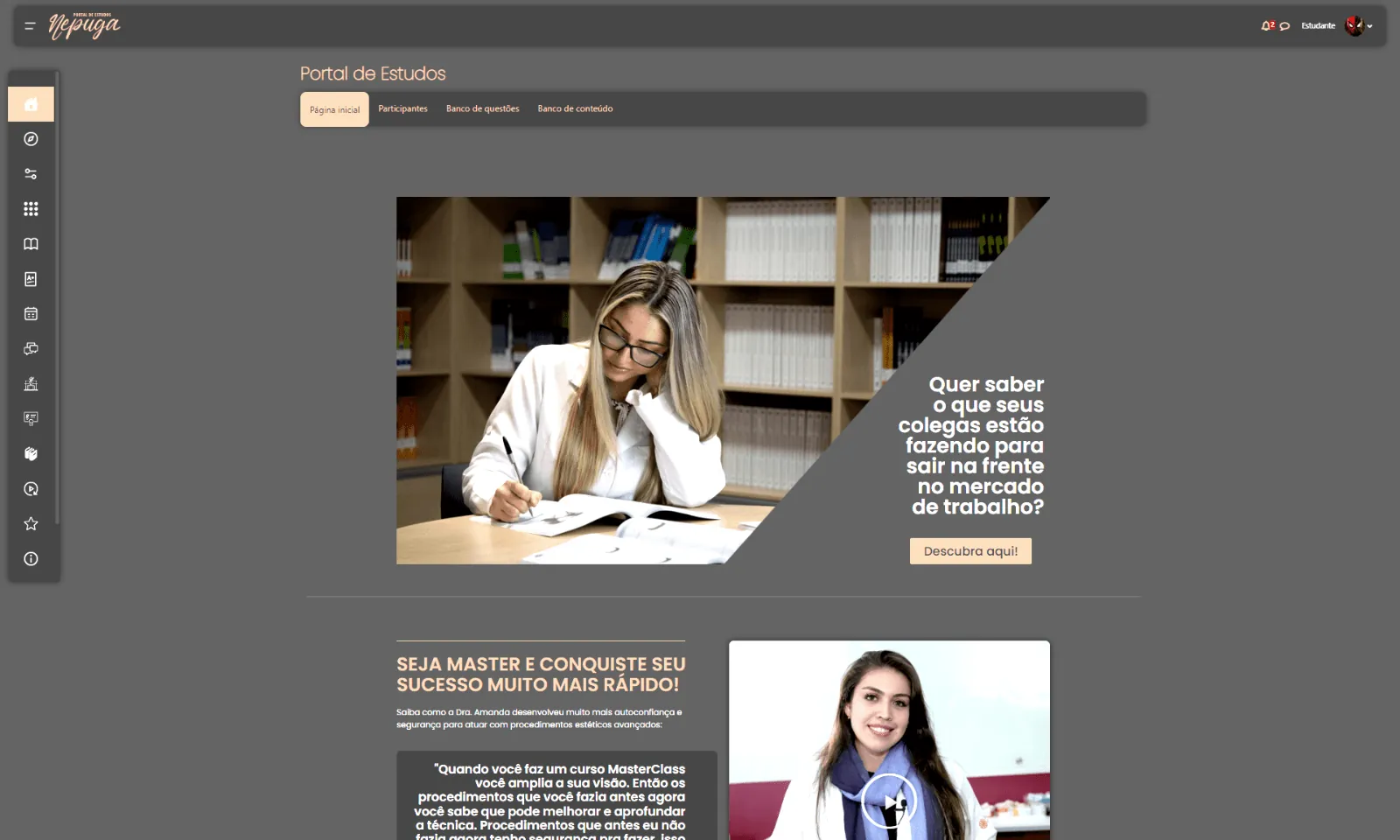
The home page
The study portal's home page has been restructured. On the left side there are topics that point to faster shortcuts for accessing content, such as courses, the forum, the library, micro-certificates and much more. Below, see some of the home page's new features.
Exclusive opportunities
Nepuga students get a financial benefit, given through discounts on new courses, which are important for continuing professional growth. On the home page there is a block that highlights the best opportunities of the moment.
Success stories
Nepuga is keen to tell its students' success stories. And there is a page for that. Interested students can contact the people responsible for creating these narratives through “Tell Your Story”. The stories are published on the Nepuga website.
The best events
Also on the home page, you can discover Nepuga's best events on a chronological timeline. Students can search by date or location, which allows more efficient study planning.
The internal pages
After reaching the home page, the student starts using various shortcuts. Internally, there are also new features, especially because the IT (Information Technology) team focused on the best user experience, speeding up access and synchronizing data.
Activities
After accessing their aesthetics program, users see a range of available categories. For example, courses, announcements, the library, certificates, bookings, the forum, shortcuts, academic highlights and success stories.
Courses
Within the courses, which correspond to each aesthetics program, students can access each subject in their curriculum. In the example below: semiology, ozone therapy, mesotherapy, peels, laser therapy and much more.
Classes
Each course contains its classes. They are organized in order and with titles, which makes the student's life much easier. This is also where you find the icons for extracurricular content, recorded Zoom classes, practice tests, exams, surveys and the forum.
The forum
The discussion forum is categorized by course. That is, each one has its own forum, a space reserved for students and professors to exchange ideas, suggestions, questions and everything else related to that content.
The library
There is also a reading space. Through quick buttons, interested students can reach the online collection or digital journals made available on the portal.
Certificates
As students complete courses, they earn their micro-certificate, which is important for their work in the market. These documents, along with the congratulations letter, are available in the certificates tab.
Class bookings
Now you can schedule hands-on classes in a few clicks. All you need to do is choose the campus and the available date, and the confirmation is made.
Job openings
For those who don't yet work in the field or want to hire, Nepuga has a job openings area that lets you search for new job opportunities.
To get your questions answered about Nepuga's new study portal
If you have any questions about the student portal's services and shortcuts, note that there are several tutorial videos available on Youtube with the answers. With them, every user can navigate the platform without any complications.
Institutional|NewsIrving Malaguti
NEPUGA content team — Núcleo de Especializações Ana Carolina Puga.